
Explore Patient ResourcesBilling Costs Insurance
Navigating medical bills and insurance can be complicated. We are here to help.
Insurance Information & Preregistration
Insurance Accepted
Commercial Plans
- 1st Choice Coventry
- Aetna
- Anthem Blue Cross and Blue Shield
- Cigna
- ConnectiCare
- Coventry
- CSG/CHN PPO
- First Health
- Harvard Pilgrim Healthcare
- Health New England
- Humana (PPO Only)
- MultiPlan/PHCS
- Oxford Health Plans
- UniCare
- UnitedHealthcare
Government Plans
- Medicare - Traditional
- Medicaid - Connecticut Only
- Railroad Medicare
- TRICARE/CHAMPUS
Managed Medicare Plans
- Aetna - Medicare Advantage
- Anthem - Medicare Advantage
- CarePartners of Connecticut - Medicare Advantage
- ConnectiCare - Medicare Advantage including Passage Plans
- Humana - Medicare Advantage
- Oxford - Medicare Advantage
- UnitedHealthcare - Medicare Advantage - Evercare
- WellCare Health Plans - Medicare Advantage
Behavioral Health Plans
- Aetna Behavioral Health
- Anthem Behavioral Health
- Beacon Behavioral Health
- Evernorth (formerly Cigna) Behavioral Health
- Magellan Behavioral Health
- Optum Behavioral Health
- Value Options
Insurance Companies (Workers’ Compensation)
Workers’ Compensation Insurance Companies
- Aetna
- Berkley Administrators of Connecticut
- Broadspire
- CAN
- Chartis Insurance
- Chubb
- CIRMA
- Connecticut Guarantee Fund
- Connecticut Healthcare - Workers’ Compensation
- Trust
- Corvel
- Coventry
- Crawford and Company
- Crum and Foster
- ESIS
- Fireman’s Fund
- Gallagher Bassett (GAB Robins)
- Hanover Insurance
- Liberty Mutual
- MAC Risk Management
- Peerless Insurance
- PMA Companies
- Prime Health Services
- Procura
- Risk Enterprise Management
- Sedgwick
- Specialty Risk Services
- State of Connecticut Workers Comp
- The Hartford
- Travelers
- TRPN (Three Rivers Provider Network)
- Trust
- U.S. Department of Labor
- Utica
- Zurich Insurance
Preregistration
Registering for your scheduled services will help speed up your appointment time and assist with timely insurance processing. It also helps our team find financial assistance programs you may qualify for. To preregister for your upcoming appointment, please call 860-679-1600.
Have Questions About Medicare?
If you are Medicare-eligible, you can find free, unbiased insurance counseling and education at CHOICES. To speak with an expert, call 1-800-994-9442 or visit the CHOICES website.
Billing & Payments
Request an Estimate
If you have an upcoming appointment, test, or procedure and would like to receive an estimate of what you will owe, please contact our Estimates team at 860-679-5101.
Pay Your Bill
To pay online, visit the MyChart website. Through the website, you can sign up for MyChart or pay as a guest without a MyChart account.
You can also call 860-679-6387 and use our interactive voice response system. Through an automated phone agent, you can conveniently make payments, check your balance, and review your payment history 24/7.
Need to Pay With Cash?
UConn Health accepts cash payments in our business office on 16 Munson Road in Farmington. Please call our customer service team at 860-679-6387 to schedule an appointment.
*Please note that cash is also accepted in our Emergency Department.
Payment Plans
To enroll in a self-service payment plan, visit the MyChart website. Our payment plans are interest-free, and we offer flexible options for eligible balances to meet your needs. Need help setting up your plan? Call 860-679-6387 to speak with one of our customer service representatives.
Updating Your Auto Pay Method
6 Steps to Update Auto Pay for Your Payment Plan in MyChart
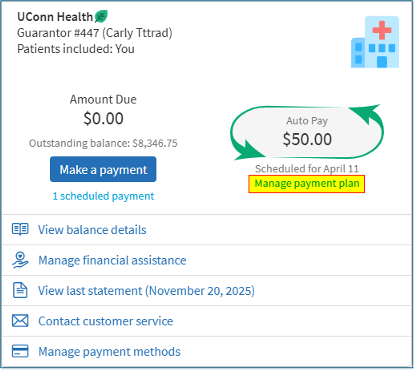
1. Go to Billing Summary. Click on Manage Payment Plan.
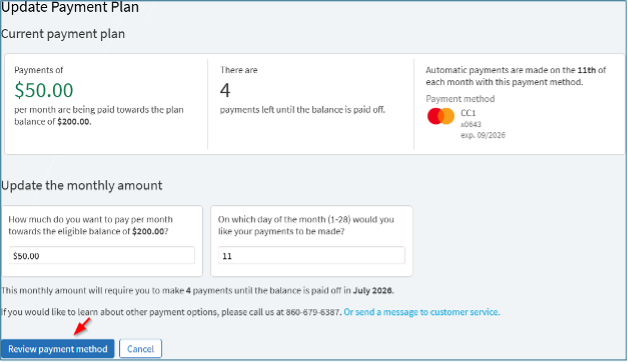
2. Click the Review Payment Method button at the bottom of the screen.
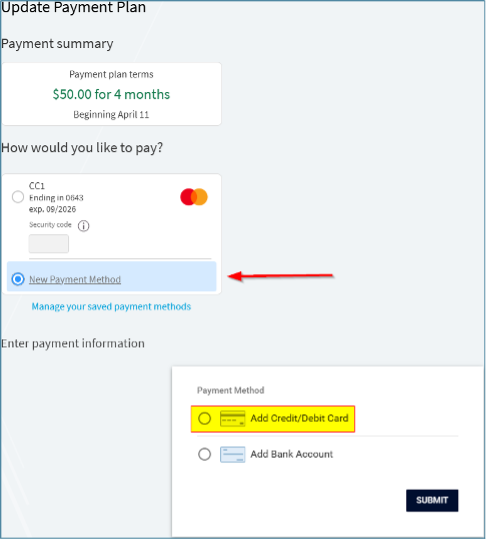
3. Click the New Payment Method option and then click the Add Credit/Debit Card option.
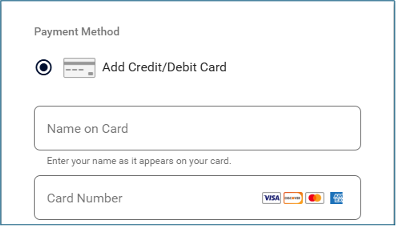
4. Enter ALL of the required card details that appear when selecting the credit/debit card payment method.
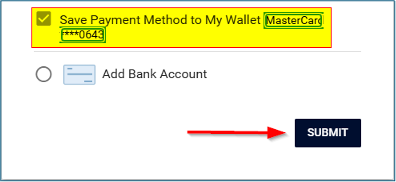
5. At the bottom of the form, the new payment method name is a link where a patient can enter a nickname for the card by clicking on the link. Once the nickname is added or the information is complete, click the SUBMIT button.
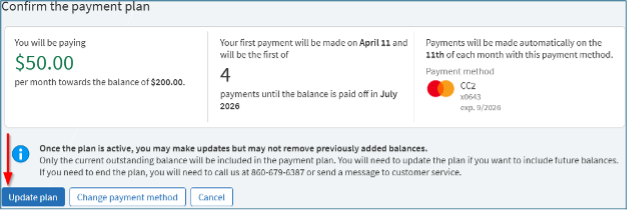
6. The new information is displayed on the screen. Click the Update Plan button to complete the change.
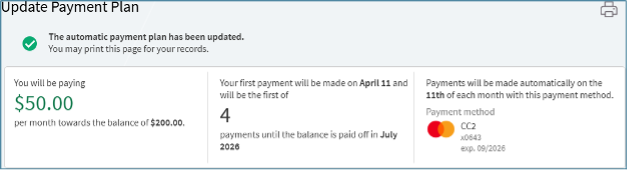
The screen will then show the updated payment plan information.
Go Paperless!
Want to help do your part in protecting the environment while also staying more organized? Sign up for paperless billing. Your account status and information will be available to you day or night, and you can access it from anywhere. Learn more about paperless billing.
Contact Customer Service
Eligible services will be submitted to your insurance carrier. Any balances assigned to you by your insurance carrier will be sent to you in the form of a statement. Payments can be made online, over the phone, or through the mail by attaching it to your statement. To make a payment or speak to customer service, please call 860-679-6387 or visit the MyChart website. Through the website, you can sign up for MyChart or pay as a guest without a MyChart account.
Financial Counseling
UConn Health offers a financial assistance program to patients without insurance for medically necessary services. This program is available to State of Connecticut legal residents whose household incomes do not exceed 400% of the Federal Poverty Level Guidelines for a family unit. To be eligible, patients may need to apply and be denied for any medical or health care coverage provided through the Connecticut Medicaid program. Patients must provide proof of income to qualify. Please contact our Financial Counselors at 860-679-4120 for more information.
Financial Assistance Policy & Application
Read our financial assistance policy.
Download the financial assistance application.
Financial Assistance Additional Resources
Assistance With Medicaid & Insurance Enrollment Through Access Health CT
Financial Counselors are available to assist patients with applying to several programs here in Connecticut, including Connecticut Medicaid and individual insurance through Access Health CT. Please contact our Financial Counselors at 860-679-4120 for more information.
Covered Connecticut Program
Access Health CT also offers the Covered Connecticut Program. Covered Connecticut is a no-cost health insurance program available to eligible adults and families. The program, administered by the Department of Social Services, was updated on July 1, 2022, and now provides no-cost health insurance, including dental care and non-emergency medical transportation benefits, to eligible adults and families within a specific income range. Please contact our Financial Counselors at 860-679-4120 to see if you qualify. You may also visit the Access Health CT website for more information.